Overview
GeckoStats is a web analytics product built around one question: which traffic actually pays? Instead of stopping at pageviews and bounce rates, it follows a visitor from the first click through to the payment that follows, then puts money beside the channel, campaign, page, or search query responsible for it. The scope is narrow on purpose. This is not an enterprise suite for marketing departments with dashboards nobody reads. It is revenue-first analytics for people who sell something online, whether that is a solo SaaS founder, a newsletter writer with a paid tier, or a small team running several sites.
The category is crowded. Plausible, Fathom, Simple Analytics, Umami, and DataFast all compete for the same privacy-conscious buyer, and Google Analytics stays the default despite its complexity. GeckoStats separates itself by leaning hard into attribution. It connects to Stripe, Dodo Payments, Polar, and Creem, reads Google Search Console, and ships an MCP server so AI assistants can query the same numbers the dashboard draws. The comparison pages are unusually candid, and each one names what the competing product does better, which is a rare bit of self-awareness in a market that mostly shouts.
Key Features
- Revenue attribution beside every source and campaign. A payment webhook from Stripe, Dodo Payments, Polar, or Creem brings each sale back to the visitor id carried through checkout, so the channel table shows visitors and dollars on the same row. Anything else can post an amount and a visitor id with a single API call. When the visitor id is missing, the system falls back through the return page, earlier payments, an identified email, and finally checkout timing, and it reports which match was used.
- Full customer journeys from first click to payment. Opening a profile reveals location, device, browser, first source, total spent, and time to first payment, followed by a timeline of every session and pageview with payments slotted in. A conversion that took eight days and three visits becomes visible as a sequence rather than an abstract number, which is exactly the detail that changes where a founder spends the next hour.
- Search Console queries ranked by what they earn. Authorize Google Search Console once and the dashboard lists queries, clicks, positions, and an apportioned revenue figure per query. Estimates are clearly marked with an approximation symbol instead of being printed as fact, and the ranking puts money first rather than volume. It reads what Google already knows, with no crawler of its own.
- AI crawler visibility. Crawlers do not execute JavaScript, so a tracker script cannot see them. GeckoStats reports what GPTBot, ClaudeBot, PerplexityBot, and Gemini read directly from the server side, then sets pages read against the visitors those same services sent back and the revenue those visits produced. For anyone publishing content that AI assistants summarize, this closes a real blind spot.
- A live globe and event feed. A real-time map shows who is on the site right now, paired with a feed of pageviews, goals, and payments as they land. Sound can be switched on for sales, a small touch aimed at founders who like ambient feedback while working.
- An MCP server with 26 read-only tools. Overview, sources, pages, campaigns, goals, funnels, customers, search queries, releases, and the live view are all exposed to Claude, Claude Code, ChatGPT, Cursor, Grok, Gemini CLI, Hermes, and any other MCP client. Keys are issued per website, can be rotated, and can be revoked from settings. The tools read the same query path the dashboard uses, so an agent is not working from a stale export.
- Cookieless tracking on a light script. The tracker weighs 6.6 KB gzipped, has no dependencies, and loads after the page. By default it sets no cookies at all: a visitor is a salted hash that rotates daily, and the IP address is never written to storage. A one-line rewrite serves the script from the site's own domain so ad blockers do not see it.
Beyond the headline features, every plan carries goals and funnels, subscriptions and MRR tracking with churn and lifetime value by source, alerts for broken tracking or falling revenue, release markers dropped in with a curl at deploy time, retention cohorts, one-click filters that follow a row through the whole dashboard, and a PNG export of any period drawn from the numbers rather than screenshotted.
How It Works
Setup starts with a free trial account and a site added to the dashboard. GeckoStats hands back a short script that loads after the page and does not block rendering. From there the work splits into two optional tracks. The first is payments: connecting a provider such as Stripe through a single webhook means every checkout carries the visitor id and every payment comes back to the right person. The second is search: authorizing Search Console once fills the query table with positions and clicks. Neither step is mandatory, and a site can run as a plain traffic dashboard before either is wired up.
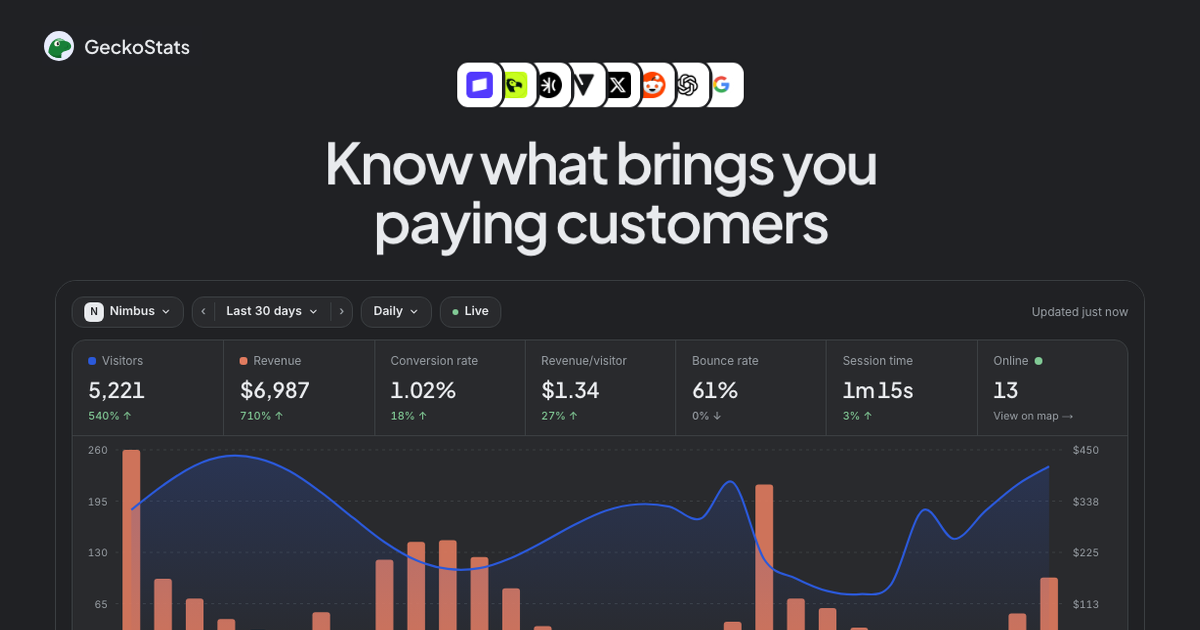
The main screen opens on the overview, with visitors, revenue, conversion rate, revenue per visitor, bounce rate, and session time across the top, and a chart that shows traffic and revenue moving together. Every row in every table below it is clickable, so filtering by a single campaign narrows the entire dashboard rather than one widget. The same data can be previewed without an account through the public demo, which is a genuinely useful way to judge the layout before committing.
Daily use tends to be brief. A founder checks the channel list, sees which post or query moved, and either repeats it or drops it. The agentic side asks for a little more appetite: adding the MCP server takes one terminal command or a connector in ChatGPT, and after that questions can be asked in plain language against the dashboard's own numbers. That step is clearly more technical than everything else in the product, and the site does not pretend otherwise.
Use Cases
A solo founder launching a B2B SaaS. The launch tweet, the newsletter mention, and the Product Hunt post all run in the same week. Tagged campaign links separate them, and two weeks later the campaign table shows which one produced trials that converted to paid rather than merely clicked. The decision about what to write next stops being a guess.
A newsletter writer with a paid tier. Each issue goes out with a tagged link. The dashboard names the issue, the visitors it brought, and the subscriptions it eventually produced, even when the reader subscribes days later. Attribution credits the last visit from a real source, so a direct return visit does not erase the original issue.
A content site that depends on organic search. Connecting Search Console turns a list of keywords into a list of keywords with money attached. Queries that rank well but earn nothing fall down the page, and phrases sitting at position five with visible revenue move to the top of the queue. Pages that lost clicks at an unchanged position get flagged before the traffic drop becomes a revenue drop.
A team worried about AI summarization. Pages get read by assistants and cited in answers, and the crawler table shows which agents took what and which ones sent paying visitors back. That is a concrete answer to a question most analytics tools cannot address at all.
A developer testing a new landing page. Release markers put a tag on the chart at deploy time, so a movement in conversions can be read against what shipped. Retention cohorts then show whether the new signups came back the following week or quietly disappeared.
Pricing & Value
Two plans sit on a single events slider running from 25K to 10M a month. Starter costs $17 a month at 100K events and covers one site and one person. Growth costs $35 a month at the same volume but lifts the ceiling to 30 sites and 30 team seats. Yearly billing knocks roughly 17 percent off. Every plan starts with seven days free, and there is no free tier beyond that trial.
The interesting part is what is included. Provider integrations, Search Console, the live globe, funnels, MRR tracking, and the MCP server appear on both plans, so the upgrade decision is about sites and seats rather than feature gates. Going over the event limit does not drop data; the dashboard keeps counting and a note suggests the next size up. Prices exclude VAT, which may be added at checkout depending on location.
Against the field, $17 for 100K events sits close to what Plausible and Fathom charge for similar volume, and none of those competitors bundle revenue attribution and an MCP server into the entry price. The honest caveat is that a one-site Starter plan is genuinely small, and anyone running more than a single project will be on Growth from day one.
Final Verdict
GeckoStats understands that most small teams do not have an analytics problem, they have a prioritization problem. Showing revenue next to each source, campaign, and query answers the question people actually ask, and doing it without cookies or a consent banner removes a recurring annoyance. The MCP server is the sharpest differentiator: an AI assistant reading the same numbers the dashboard draws is a real workflow improvement rather than a checkbox, and per-site revocable keys keep it sane.
The trade-offs are worth naming. Search query revenue is apportioned, so those figures guide decisions rather than settle arguments. Starter is thin for anyone with more than one site. The agent tooling assumes comfort with a terminal. And the product does not attempt the deep behavioral segmentation that larger suites offer, which is fine for its audience but worth knowing.
For indie founders, newsletter operators, and small product teams who sell something and want to know what earned it, this is a strong fit with a fair price and a fast setup. Anyone needing warehouse-scale analytics or heavy enterprise reporting should look elsewhere. For everyone else, the seven-day trial is enough time to connect one payment provider and see whether the revenue view changes how the week gets planned.