Overview
MySOP.guru is a Chrome extension that turns any browser-based workflow into a professional Standard Operating Procedure (SOP) document. It is built for people and teams that do not document processes every day, but find themselves occasionally needing to write down how something works. Think of an HR manager onboarding a new starter, a finance person documenting month-end close, an operations lead capturing a handover before an employee leaves, or a consultant delivering client handover documentation. For all of them, traditional documentation tools come with monthly per-seat subscriptions that feel wasteful when documentation is sporadic. MySOP.guru flips that model: capture and edit workflows for free, pay only when you export a document. The first export is free, after that it is €5 per PDF or €3 per HTML file. The extension records every click, form entry, and page navigation, takes screenshots, adds numbered callouts, and packages everything into a branded document ready to send. The positioning is clear: almost nobody documents daily, but almost everybody documents sometimes, and this tool is priced for exactly that reality.
Key Features
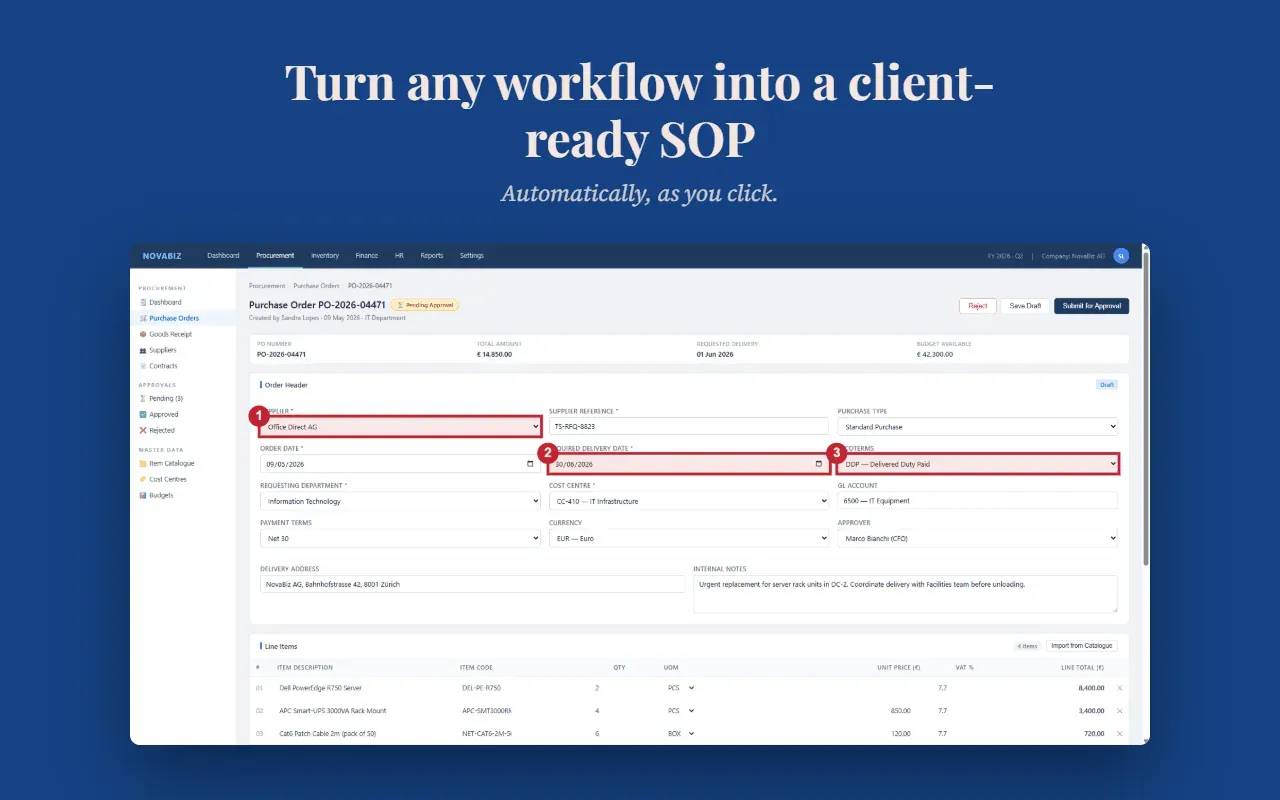
- Automatic Screenshot Capture: Every interaction during a capture session is recorded with a full-page screenshot. The extension draws a numbered badge over the element you clicked or typed into, making it obvious to the reader exactly where to look. This replaces the tedious process of taking and editing screenshots manually.
- Smart Page Grouping: Multiple interactions on the same page are grouped into a single step with a sub-action list. The result is a concise SOP that does not repeat the same page screenshot five times, keeping the document readable and professional.
- Professional PDF Export: Exports are rendered as polished PDFs with your logo, header, footer, page numbers, and a clean visual layout. The document arrives ready to send to a new starter, an auditor, or a client, without needing further formatting work.
- Full Editor Control: Before export, users can reorder steps with drag-and-drop, edit descriptions inline, split or merge steps, and delete anything unnecessary. This editing power is available for free and without time limits, so the final document can be shaped to fit the exact process.
- Your Branding, Your Document: The tool supports uploading a logo, choosing fonts, setting colours, and adding custom header and footer text. Every export carries the organisation’s identity, not the tool’s, which is particularly valuable for consultants delivering client-facing documentation.
- No Subscription Lock-in: Capture, edit, and refine as many workflows as needed at no cost. Payment only occurs when an export is requested. Quiet months cost nothing, and busy months scale with actual output.
- Privacy and Security: The extension runs only while a capture session is active. It does not monitor browsing in the background. Screenshots are stored in Cloudflare R2 in the EU, and the backend runs on EU infrastructure. Data is encrypted in transit, never sold, and never used to train AI models. Users can request account deletion at any time. The privacy policy provides more details on data handling.
How It Works
The first step is to install the Chrome extension from the Chrome Web Store. The installation asks for no website permissions at all; the extension only requests access to the pages you decide to document, and that access is optional and requested separately the first time you press Start.
Once installed, click the toolbar icon to start a capture session. Perform the workflow exactly as you normally would. Every click, form entry, and page transition is recorded, and a full screenshot is taken for each new page. You can move freely within the same web application, though the session is limited to a single application; switching to a different website partway through will not capture the steps from the second one.
After the session, the editor opens. You can review the automatically generated steps, reorder them with drag-and-drop, edit the descriptions, add sub-actions, or delete anything that is irrelevant. Everything up to this point is completely free and unlimited.
When the document is ready, choose PDF or HTML export. The first export is free and requires no credit card. Subsequent exports cost €5 for PDF and €3 for HTML, with discounts available for credit bundles. Payment is processed through Stripe, and the download is available immediately after payment.
Use Cases
- An HR professional onboarding a new starter: Capturing the account setup process for one new employee takes about five minutes. The same document can then be reused for every future hire, ensuring consistency and reducing the time spent answering the same questions repeatedly.
- A finance manager documenting month-end close: The sequence of tasks that one person remembers each month can be captured the next time it is performed. The output is a clear, numbered procedure that the whole team can follow, removing the risk of a forgotten step during a busy period.
- An operations lead handling a handover before someone leaves: When a resignation arrives, the departing employee can walk through their daily workflow once. The exported SOP becomes institutional knowledge, saving the team from a scramble to figure out how systems actually work.
- An IT administrator documenting a change to an internal tool: When a CRM or admin panel is upgraded, the new process can be documented the same afternoon it is configured. This prevents a flood of support tickets and gives users a reference that matches the new interface.
- A consultant delivering implementation documentation: Instead of spending an evening writing Word documents, the consultant records the completed workflow, applies their own branding, and hands over a professional PDF at the end of the engagement.
Pricing & Value
MySOP.guru uses a simple pay-per-export model. Capturing and editing workflows is always free. The first export is free as well, so users can see the full output before spending anything. After that, a PDF export costs €5 and an HTML export costs €3, with VAT added where applicable. Credit bundles reduce the price: 10 documents cost €40 (€4 per document), and 25 documents cost €90 (€3.60 per document). Credits are valid for 24 months, and the team emails users before any credits expire.
Compared to subscription-based documentation tools that charge $15 to $29 per seat per month, this model is considerably cheaper for teams that only produce a handful of documents each year. For a small team producing three documents annually, a subscription would effectively cost north of $100 per document. MySOP.guru charges €5 for each, and nothing in the months when no documentation is needed. The trade-off is that frequent exporters might spend more than a flat subscription, but for the target audience of occasional documenters, the per-export pricing aligns directly with value delivered. You can read more about the company's perspective on the company blog.
Final Verdict
MySOP.guru is a thoughtfully designed tool for a specific and common pain: turning a live workflow into a clean, shareable document without the overhead of a permanent documentation system. The Chrome extension is easy to install, the capture process is intuitive, and the editor gives enough control to make each SOP accurate and useful. The pay-per-export pricing is refreshingly honest for businesses that document intermittently, and the first free export is a low-risk way to evaluate the whole workflow.
The main limitation is that a single capture session cannot span multiple applications. For processes that genuinely live in two or more web apps, users need to split the work into separate documents. The HTML export is also less polished than the PDF version, though it serves the purpose of posting to an intranet or knowledge base. Support for multi-application capture is listed on the roadmap, so this may improve over time. The terms of service outline current usage rules and future expectations.
Overall, MySOP.guru is recommended for any small team, consultant, or individual who occasionally needs to produce a standard operating procedure without committing to a monthly subscription. It is not built for teams that document all day, every day, but for everyone else it offers a fast, affordable, and professional way to get the knowledge out of someone's head and into a usable form.